Explore Computer Internal Components
Computer internal components are the parts installed inside a desktop or workstation that process instructions, store data, supply power, and manage heat. The central processing unit (CPU), motherboard, memory, storage drive, graphics card, power supply, and cooling system each serve a different role, yet must work together as a compatible build. Options range from essential replacement parts to performance upgrades for gaming, creative work, office tasks, and home computing. Components vary in speed, capacity, dimensions, power requirements, and connection standards, so comparing specifications helps narrow the choices. Ubuy provides a place to discover international computer hardware and related products across these component types. Understanding how each part contributes to a system makes it easier to identify useful upgrades and avoid paying for features that do not match your needs.
- Core parts for building, upgrading, and repairing PCs
- Compare performance, form factor, and connection standards
- Suitable for gaming, work, and everyday computing
Processors, Motherboards, and Memory
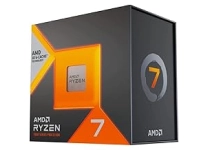
The CPU executes applications and system instructions, making core count, clock speed, architecture, and socket compatibility important considerations. Mainstream processors from Intel and AMD cover a range of everyday and demanding workloads; the right choice depends on the motherboard platform and intended use. A motherboard connects the CPU, memory, storage, graphics card, and peripherals. Check its CPU socket, chipset, form factor, expansion slots, and supported memory generation before buying. Random-access memory (RAM) provides short-term working space for active programs. Capacity, speed, module type, and the number of available slots affect both performance and future upgrades. DDR generations are not interchangeable, and a system's motherboard and processor determine supported configurations. Together, these parts establish the foundation and upgrade path of a computer, so checking manufacturer specifications can prevent mismatched purchases.
- Match the CPU socket and chipset to the motherboard
- Check RAM generation, capacity, and supported speed
- Compare board size, slots, and expansion options
Storage Drives and Graphics Cards
Storage determines how much data a computer can keep and how quickly it can load files and applications. Solid-state drives (SSDs) offer responsive access, with M.2 NVMe models using PCIe interfaces and 2.5-inch SATA drives fitting many existing systems. Hard disk drives (HDDs) remain an option for larger files and archives. Confirm the drive interface, physical size, motherboard slots, and available power or data connections. A graphics processing unit (GPU) renders images, accelerates supported creative tasks, and drives displays. Discrete graphics cards differ in processing capability, video memory, cooling design, card length, and power demand; integrated graphics are built into some processors. Ubuy can help shoppers explore international component options, but exact specifications should be compared with the system's available space and connections before selecting a drive or GPU.
- Choose NVMe, SATA SSD, or HDD for your workload
- Check GPU dimensions, power draw, and display outputs
- Consider capacity, speed, and intended applications
Power, Cooling, and Case Components
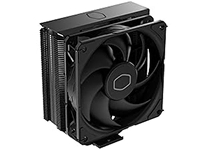
A power supply unit (PSU) converts mains power for a computer's components, so its wattage and connector set must suit the build. Account for the CPU, graphics card, drives, and planned upgrades, and check the required PCIe, CPU, and motherboard power connectors. Modular PSUs can reduce unused cabling, while efficiency ratings describe power conversion performance rather than compatibility. Cooling hardware helps manage heat and noise. Air coolers use heatsinks and fans; liquid coolers circulate coolant through a radiator. Confirm cooler clearance, radiator support, and CPU socket fit. The case determines motherboard form-factor support, graphics-card length, drive bays, airflow, and front-panel connections. Case fans, thermal paste, and cable-management accessories can support a tidy installation. Considering these parts together helps balance temperatures, acoustics, available space, and reliable operation.
- Match PSU connectors and capacity to the build
- Check cooler clearance and socket compatibility
- Confirm case fit, airflow, and front-panel ports
Compatibility, Installation, and Maintenance
Before ordering computer internal components, compare each part with the system's existing hardware and the manufacturer's compatibility documentation. Verify CPU socket and chipset support, memory type, drive interface, graphics-card clearance, PSU connectors, and case form factor. For upgrades, identify the exact computer model or motherboard revision where possible; prebuilt desktops may use proprietary dimensions or connections. During installation, switch off and unplug the computer, handle circuit boards by their edges, and follow the component instructions. Use appropriate tools and avoid forcing connectors. Keep fans and vents free of dust, check that cables do not obstruct airflow, and update firmware or drivers when needed using trusted manufacturer sources. These basic habits support dependable operation and make future troubleshooting more straightforward, whether replacing one part or assembling a full system.
- Check exact model and motherboard specifications first
- Follow safe handling and installation instructions
- Keep cooling paths clean and software current
Select the Right computer internal components
Start with the computer's purpose, such as everyday browsing, multitasking, gaming, content creation, or a compact workstation. Set priorities for processing power, graphics performance, memory capacity, storage space, noise, and upgrade flexibility, then compare components against those needs. Build a compatibility list before purchasing: CPU and motherboard, RAM generation, storage connections, GPU dimensions, PSU capacity and connectors, and case clearances. If replacing one part, confirm the rest of the system can support it; a powerful graphics card, for example, may also require suitable power and cooling. Consider accessories such as additional fans, SATA cables, or thermal paste when they are needed for installation. Ubuy offers a platform for discovering international computer hardware, while product specifications remain essential for comparing options. A balanced selection can deliver useful performance without unnecessary complexity.
- Set a clear budget and workload priority
- Verify every component against the full build
- Choose upgrade potential without overspending