Camera Types for Different Ways of Shooting
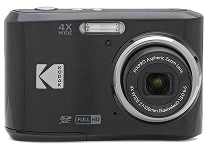
Camera choices range from compact point-and-shoot models to interchangeable-lens systems designed for greater creative control. Mirrorless cameras are popular for their electronic viewfinders, fast autofocus, and relatively compact bodies, while DSLR cameras use an optical viewfinder and may suit photographers who prefer a traditional shooting experience. Bridge cameras combine a built-in zoom lens with manual controls, and rugged compact cameras are built for use in demanding outdoor settings. Instant cameras produce physical prints, while action cameras capture hands-free footage with compact, durable designs. For travel, family photography, portraits, wildlife, or everyday content, consider how much zoom, control, and portability you need. Ubuy can help shoppers discover international camera products across different formats, so compare specifications and system requirements before choosing a model.
- Compact, bridge, mirrorless, DSLR, instant, and action cameras
- Match camera format to subject and shooting style
- Balance portability, zoom, and creative control
Image Quality, Sensors, and Essential Features
Image quality depends on more than megapixel count. Sensor size affects how much light a camera can capture and can influence detail, depth of field, and performance in dim conditions. Larger sensors are common in advanced mirrorless and DSLR cameras, while smaller sensors help keep compact cameras lightweight. Look at resolution alongside lens quality, image processing, and the types of photos you plan to make. Autofocus features such as subject detection and eye tracking can help keep moving people or animals sharp. Optical image stabilization reduces blur from camera movement, and burst shooting supports action photography. A viewfinder can make framing easier in bright conditions; a tilting or fully articulating screen is useful for low-angle, overhead, and self-recorded shots. Check battery life, storage-card support, and available controls as part of the comparison.
- Consider sensor size as well as resolution
- Compare autofocus, stabilization, and burst speed
- Check viewfinder, screen, battery, and card support
Lenses, Accessories, and System Compatibility
With an interchangeable-lens camera, the lens mount determines which lenses fit directly, while adapters may support some additional combinations with varying functionality. A standard zoom is a flexible starting point; wide-angle lenses suit landscapes and interiors, telephoto lenses bring distant subjects closer, and prime lenses offer a fixed focal length that can encourage deliberate composition. Macro lenses are designed for close-up detail. Before buying, confirm mount compatibility, autofocus support, and whether the lens covers the sensor format. Useful accessories include spare batteries, memory cards that meet the camera's speed requirements, a protective bag, a tripod, and a lens-cleaning cloth. External flashes and microphones can expand photography and video options. Ubuy offers a place to explore international camera bodies, lenses, and accessories; check product specifications carefully to ensure components work together.
- Confirm lens mount and sensor-format compatibility
- Choose focal length for the subjects you photograph
- Match accessories to camera requirements
Video, Connectivity, and Creative Workflows
Many cameras combine still photography with video tools, but recording specifications differ by model. Compare supported resolutions and frame rates, recording limits, microphone input, headphone monitoring, and stabilization to find a suitable setup for interviews, travel clips, or online content. A flip-out screen can help when recording yourself, while a hot shoe can accommodate compatible microphones or lights. For fast transfers, check whether the camera supports Wi-Fi, Bluetooth, or a wired connection, and review which file formats and companion apps are supported. USB charging or power options can be useful for extended sessions, subject to the camera's specifications. Photographers who edit images should also consider RAW capture, which preserves more processing flexibility than JPEG in compatible software. Clear compatibility checks help make sure a camera fits your existing devices and intended workflow.
- Compare resolution, frame rates, and audio inputs
- Review wireless transfer and file-format support
- Consider RAW capture and power options
Camera Care, Handling, and Everyday Use
Good camera care helps protect delicate optics and controls during regular use. Keep the lens capped when it is not in use, and remove dust with a blower or suitable cleaning tools rather than wiping grit across glass. A padded camera bag helps reduce knocks, while a strap can make carrying more secure. Check the manufacturer's guidance for operating conditions, weather sealing, and cleaning; sealing does not necessarily make a camera waterproof. Store batteries and memory cards appropriately, and format cards in the camera when its instructions recommend doing so. For extended shoots, plan battery and storage capacity around the expected number of images or video files. Beginners may value accessible automatic modes and guided controls, while experienced users may prioritize manual settings, customizable buttons, and a viewfinder. Ubuy can help shoppers browse cameras for varied experience levels and uses.
- Protect lenses, body, batteries, and memory cards
- Follow manufacturer guidance for cleaning and storage
- Choose controls that fit your experience level
Select the Right camera
Start by identifying the subjects you photograph most, how you prefer to carry your equipment, and whether stills, video, or both matter most. Compare camera types, sensor size, autofocus, stabilization, lens options, and recording features against those priorities rather than choosing by a single specification. If you are considering an interchangeable-lens system, assess the compatible lenses and accessories you may want over time, along with their size and cost. For a compact setup, check zoom range, screen design, and charging options. Review the exact model specifications, included items, supported memory cards, and compatibility details before placing an order. A simple comparison of essential features against optional extras can clarify which camera offers the right balance of capability and convenience. Choosing for your real shooting needs makes it easier to get started and build a useful photography kit.
- Prioritize your subjects and preferred camera format
- Compare system compatibility and practical features
- Verify model details and included accessories